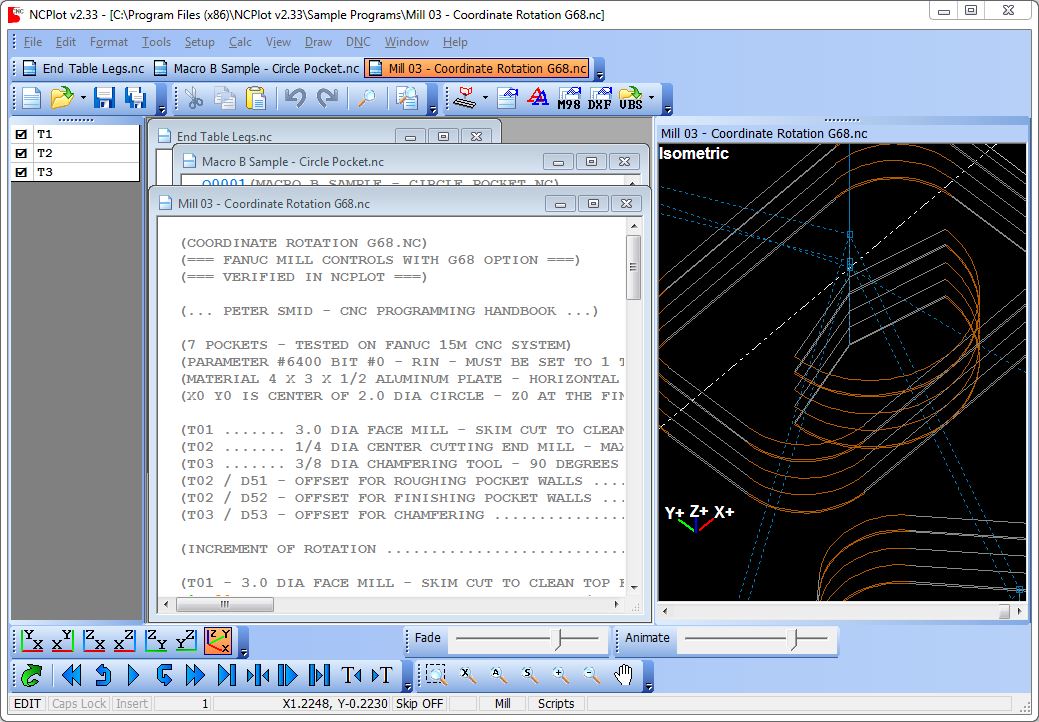
Full
featured text editor
-
Multiple document interface
allows you to open and edit multiple programs at the same time
-
Unlimited undo/redo
-
Cut, Copy and Paste
-
Find and replace
-
Font and color settings may be applied to any part of the program
-
Program coloring improves
readability
-
File comparison tool helps
you keep your programs up to date
Program formatting tools
-
Remove
block numbers, blank lines, comments or spaces
-
Program renumbering
with automatic updating of:
-
Macro GOTO references
-
M99 P_ references
-
M98 H_ references (for controls that support this)
-
M97 P_ references (for HAAS style subprograms)
-
Lathe G70 - G73 "Q" and "P" addresses
-
Insert spaces between letter addresses and
macro keywords
-
Fix invalid end of line characters
-
Convert programs to all caps
-
Add or remove comment or block skip characters
Program translation tools
-
Mirror
- Rotate
-
Shift
-
Scale
-
MultiStep Translate makes
multiple copies of part features while applying translations,
eliminating tedious copy and pasting
-
Convert coordinates
between absolute and incremental commands
-
Address
Adjustment: Apply math operations to any program addresses
-
Address Replace: Good for changing axis names, A to B, etc.
-
Address Remove: Unnecessary addresses and their values can be removed
-
Address Swap: Exchange any two program addresses
-
Address Calculator:
Create your own custom address translation tools
-
Convert absolute I / J / K arc center coordinates
to or from incremental I / J / K
-
Convert R specified arcs to or from
I / J / K specified arcs
-
Break arcs at quadrants
or into a series of line segments
Flexible
viewport control
-
A wide assortment of plot
controls lets you quickly find any mistakes in your program
-
7
view modes for Mill and 4 for Lathe
-
Dynamic zoom, rotate and pan
-
Supports 3Dconnexion
devices such as the SpaceNavigator™, SpacePilot™ and SpaceExplorer™
-
Animate, step forward or step backward
-
Draw to the cursor, from the cursor or just the selected portion of the program
-
Clicking an entity on the viewport will display the entity properties and
highlight the associated block in the program
-
View fade control makes
tool movements stand out by "dimming" other tool motions
Calc tools
|
|
Advanced G-Code backplotter
-
Backplotting for Mill and Lathe programs
-
Supports Custom Macro B
-
Can be customized for
different control requirements
-
Run time estimation reports
gives you machining time per tool and for the entire job
-
Backplotter supports:
-
G65 macro subprogram calls
-
M98 subprogram call in multiple
command formats
-
Plane selection G17, G18 and G19
-
Helical arcs
-
Automatic corner rounding, corner chamfering
in G01 motions
-
Work offsets G54 - G59
-
Extended Work offsets G54.1 P1 - P300
-
G52 Local work shift
-
G92 Coordinate system setting
-
G16 Polar
coordinates
-
G51 Coordinate
scaling
-
G51.1 Mirror image
-
G68 Coordinate
system rotation
-
G66 Modal macro call
-
G47 Haas engraving -
supports literal string, character and serial number engraving
-
Local, common and some system variables
-
Macro keywords IF, THEN, GOTO, WHILE,
DO, END and SETVN
Custom Macro B Support
Macro Debugging
Macro Translator
- This tool will translate a variable macro
into a longhand G-Code program that can be run on
any machine. It also expands subprograms into a single long program
Macro Expression Calculator
Macro Variable Renumbering
Other tools
Support for VBScripting
- Many of NCPlot's internal functions are
available for scripting. This is a powerful tool that makes it
possible to automate many common tasks such as converting files from one
machine to run on another
Text to G-Code converter
-
Instantly create
G-Code from font outlines. Great for etching, creates lettering of any
size, on an angle, or even on an arc
Network License Manager
- NCPlot licenses can be managed over a network with this free license
manager
DXF importing
/ exporting
|